


RX FOR MICROSOFT EXCHANGE
A simple, cost effective centrally managed solution using a standard Outlook/Exchange system
RESOURCEXPRESS FOR MICROSOFT EXCHANGE
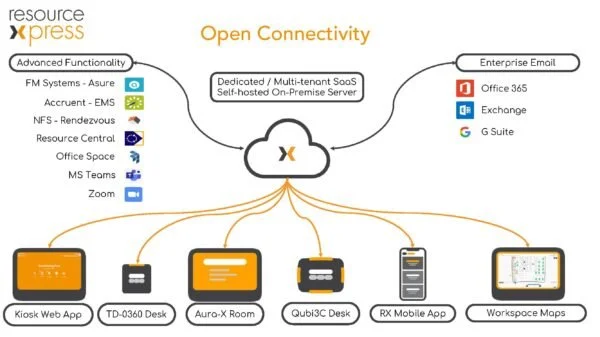
MS Exchange Booking with ResourceXpress delivers central management of the MS Graph API connection. Use any combination of meeting room screens, interactive floor plan kiosks for rooms, desks or Qsign schedule list screens in an easily managed, resilient and scalable solution.
If you’re unsure what particular system will meet your room or resource booking needs, then submit an enquiry or request a demo.
We’ll be pleased to show you how ResourceXpress can have a positive effect on your office resource productivity.
-
Complete real time visibility of workspace reservations
Complete real time visibility of room and desk, reservations
No more arguments about room bookings and subsequent disruption to meetings!
Interactive booking for instant ad-hoc reservations
Need a room quickly? No problem the system can provide real-time instant access via room screens or Qubi’s.
Solves the no-show issue for meeting rooms and desks
An optional one click check-in button confirms the reservation to retain the booking.
Comprehensive Microsoft Excel based reporting for actual resource utilization and reservation no-shows
Interactive booking for instant ad-hoc reservations
Need a workspace quickly? no problem the system can provide real-time instant access via a kiosk, a mobile device your desktop browser or by using Qubi’s.
Solves the no-show issue for workspace bookings
Use E-mail check in or checking in using Qubi. Confirms the reservation and retains the booking.
Comprehensive Microsoft Excel based reporting
Actual resource utilization and reservation no-shows – typically produces a 40% improvement in room utilization.
My Events feature on the ResourceXpress kiosk interface
Quickly lists all previous bookings on a kiosk, a mobile device or a PC desktop browser.
Find feature on the ResourceXpress kiosk interface
Lets you quickly search for workspaces by city, building, floor, workgroup or by available facilities on a kiosk, a mobile device or a PC desktop browser.
Free Desks feature on the ResourceXpress kiosk interface
Quickly locates free resources by city, building, floor, workgroup zone or by available facilities on a kiosk, a mobile device or PC desktop browser.
Maps feature on the ResourceXpress kiosk interface
Displays a user friendly floor map of all resources allowing viewers to quickly identify free resources by floor or zone on a kiosk, a mobile device or a PC desktop browser.
Qsign feature on the ResourceXpress kiosk interface
Quickly lists all current bookings in a flight board type display viewed on a kiosk PC desktop browser.
-
-
Fully customizable room screens to provide complete corporate branding for the system
Central configuration for room and desk screen operation – changes to screen configuration deployed within 60 seconds
Control of interactive screen buttons e.g. To disable at room booking if the room out of use for any reason
Messaging text creation and control – health and safety, alarm testing and security announcements etc
Screen connectivity logs – screen errors available on the web page for real-time monitoring of large systems
Smart digital signage – advertising web pages, company news and traffic Information etc
Control of interactive screen buttons e.g. to disable at room booking if room out of use for any reason
Full system wide reporting for actual resource utilization
Screen connectivity logs – screens errors available on web page for real-time monitoring of large systems\
Dual language option and language file customisation – see FAQ for details
Optional authentication to corporate user directory – track at room bookings and control access to Check-In/Check-Out/Extend buttons.
Optional email check-in for rooms and desk bookings – avoids queueing at kiosks for desk check-in
